Data handling
Your data. Exportable, deletable, and never mixed with anyone else's.
Plain answers about what the platform stores, where it lives, who can see it and how long it is kept. Written from the code, not from a template.
- Export CSV or ZIP any time
- 30-day retention after cancellation
- Recording is off until you turn it on
Ownership and export
Each company owns the data in its account: its customers, properties, equipment, jobs, estimates, invoices, payments, inventory, calls and website content. The platform operator processes that data to run the service and for nothing else.
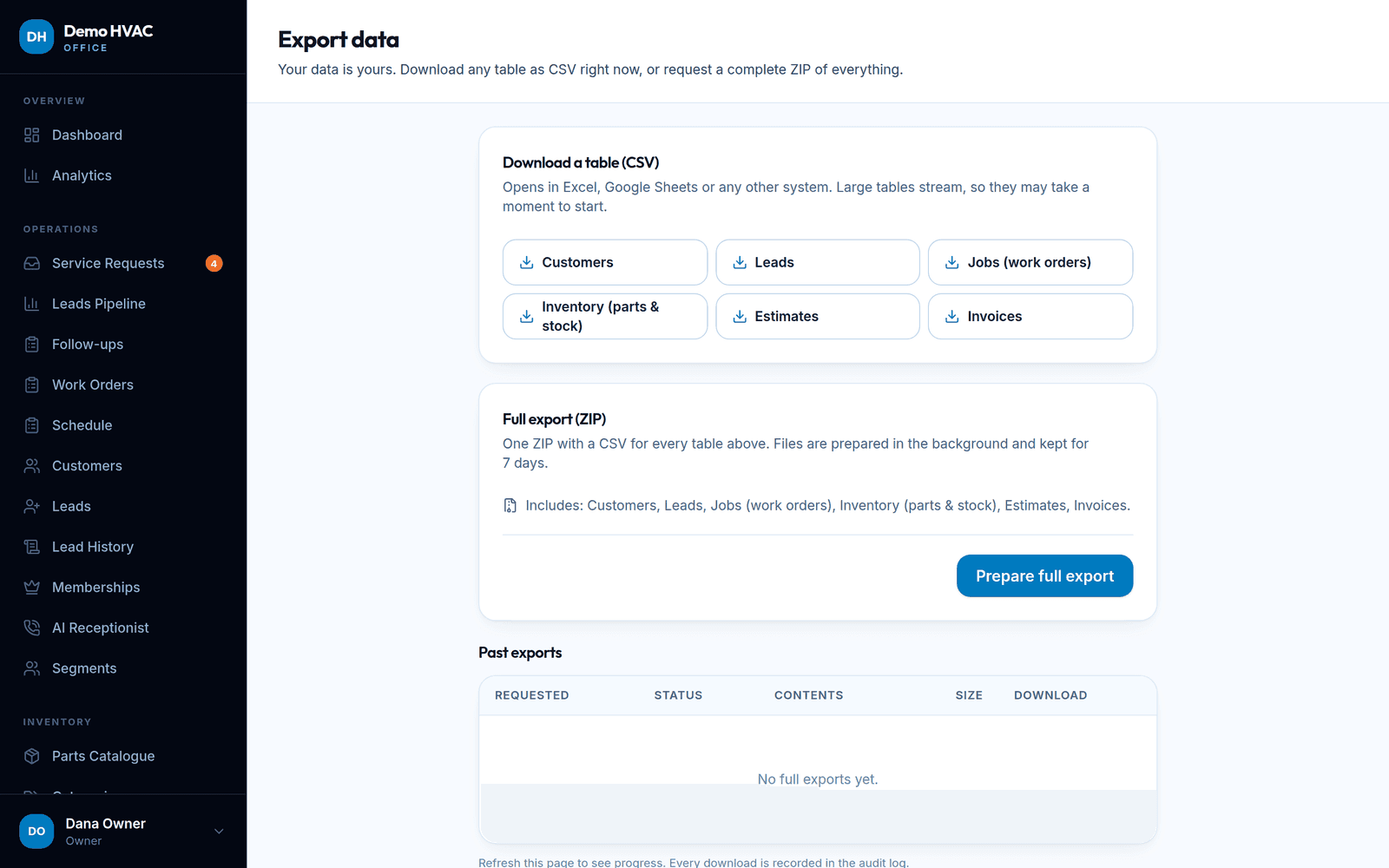
- Export any table now. Settings → Export streams Customers, Leads, Jobs, Inventory (parts and stock), Estimates and Invoices as CSV on demand.
- Full export. “Prepare full export” builds one ZIP with a CSV per table in the background; it stays downloadable for 7 days and every download is recorded in the audit log.
- Import the other way. Customers, parts and equipment can be imported from CSV, so moving in is as possible as moving out.
Retention and deletion
Deleting a company is never instant. When a company cancels, or the operator schedules deletion, the account is closed to sign-ins and kept for a retention window of 30 days so data can still be exported or the decision reversed. A scheduled task then permanently deletes the company and every row that belongs to it.
| Data | Rule |
|---|---|
| Customer records, jobs, estimates, invoices, payments | Kept for the life of the company account; many records are soft-deleted (recoverable) rather than destroyed. |
| Call transcripts and recordings | Deleted after the number of days the company sets in AI Receptionist settings; the call record itself is kept with a 'purged' marker. Recordings are deleted at Twilio too. |
| Provider webhook events | 90 days. |
| Sessions and password-reset tokens | Expired and revoked sessions after 30 days; used or expired reset tokens after 7 days. |
| Rate-limit counters | 24 hours. |
| Scheduled job run history | 90 days. |
| Full data exports (ZIP) | Available for 7 days after they are prepared. |
| Cancelled companies | Retained for the retention window (30 days by default) after deletion is scheduled, then permanently deleted with everything that belongs to the company. |
| Database backups | Nightly dumps: 14 daily and 8 weekly copies on the server. |
| Audit logs | No automatic deletion. |
Policy decisions still to be finalised by the operator with counsel: minimum retention for financial records, whether audit logs need a cap, and the platform-level minimum a company may not shorten.
Calls, recording and consent
Call recording and transcription are off by default and are switched on per company under AI Receptionist → Assistant Manager. There the company also chooses whether a disclosure message is played and how many days transcripts and recordings are kept. The AI receptionist is instructed to say it is an automated assistant when asked, and the opening wording is editable.
Call-recording consent laws differ by state and country; some require every party to consent. A disclosure message does not by itself make recording lawful. The company that turns recording on is responsible for its recording practice and disclosure wording, and we recommend an attorney reviews both first.
Marketing and service-communication consent for a company’s customers is recorded per customer with the source, the exact wording, IP address and time. Follow-up calls can be stopped for any customer from their record.
Subprocessors
These providers may process data on the platform’s behalf. The list comes from the integrations present in the code; the contractual framing (data processing agreements) is operator to confirm and will be updated here.
| Provider | Used for | Data that reaches it | When |
|---|---|---|---|
| Cloudflare | DNS, TLS, CDN, WAF, Turnstile bot check, optional custom hostnames | All web traffic in transit; visitor IP addresses | Always |
| Twilio | Phone numbers, inbound and outbound calls, media streams, recordings, SMS | Caller and callee numbers, call audio, recordings, SMS content | When a company connects its Twilio account |
| OpenAI | AI receptionist voice model and text features | Live call audio and the conversation context the company configures (caller name, address, service history, knowledge base text) | When the AI receptionist is enabled |
| Stripe | Subscription billing for the company's plan | Company billing contact; card details are entered on Stripe-hosted pages and never stored here | When a company subscribes |
| SMTP provider (operator's choice) | Transactional email: invites, estimates, invoices, receipts, reminders | Recipient addresses and document contents | Always, or the company's own SMTP if it configures one |
| Discord (optional) | Office notifications a company chooses to send | The notification text the company configures | Only if a company adds a webhook |
| Google Fonts (optional) | Web fonts on a company's public site when it picks a non-bundled font | Visitor IP and user agent | Only for that company's site |
| Hosting provider of this server | Compute and storage | Everything at rest | Always |
QuickBooks appears as a plan feature but has no integration code yet; nothing is sent there. Redis and object storage are referenced in configuration but not in use.
Where data lives
The application and its database run on the platform’s own server in the United States, behind Cloudflare. Uploaded files (photos, PDFs, logos) are stored on that server under random names, prefixed by company. Backups (14 daily and 8 weekly copies) are kept on the same server; off-server copies are on the roadmap. Twilio, OpenAI, Stripe and Cloudflare are US companies with global infrastructure; if a non-US company is onboarded the operator will determine the transfer mechanism with counsel.
What platform staff can see
- The platform console shows each company’s plan, subscription status, usage meters, health checks and platform-level audit entries. It does not show a company’s customers, jobs, documents or call content.
- To help inside an account, a platform staff member must start an impersonation session: it requires a written reason, lasts 30 minutes, shows a banner inside the company’s account for the whole time, and is written to the audit log at start and end with the reason, the staff member, IP and user agent.
- Provider credentials are encrypted and never displayed; health pages only report whether a value is present.
- Server administrators with shell access can, in principle, read the database. Named accounts and session recording for production access are on the security roadmap (see Security).
Requests from your customers
For a company’s customers, the company is the controller and the platform the processor. A company can answer access and deletion requests itself: export the customer’s record, edit or delete it from the CRM (most records soft-delete first), and stop follow-up contact from the customer’s page. Where a request needs the operator’s help — for example, purging backups ahead of schedule — contact support and it will be handled under the company’s instructions.
This page describes mechanisms in the product. It is not legal advice and not a claim of compliance with any specific law; see the privacy policy draft and terms draft.
Want the details in writing?
Ask for the current subprocessor list and retention settings before you sign up.