Dispatch & technicians
See who is where, then send the right truck.
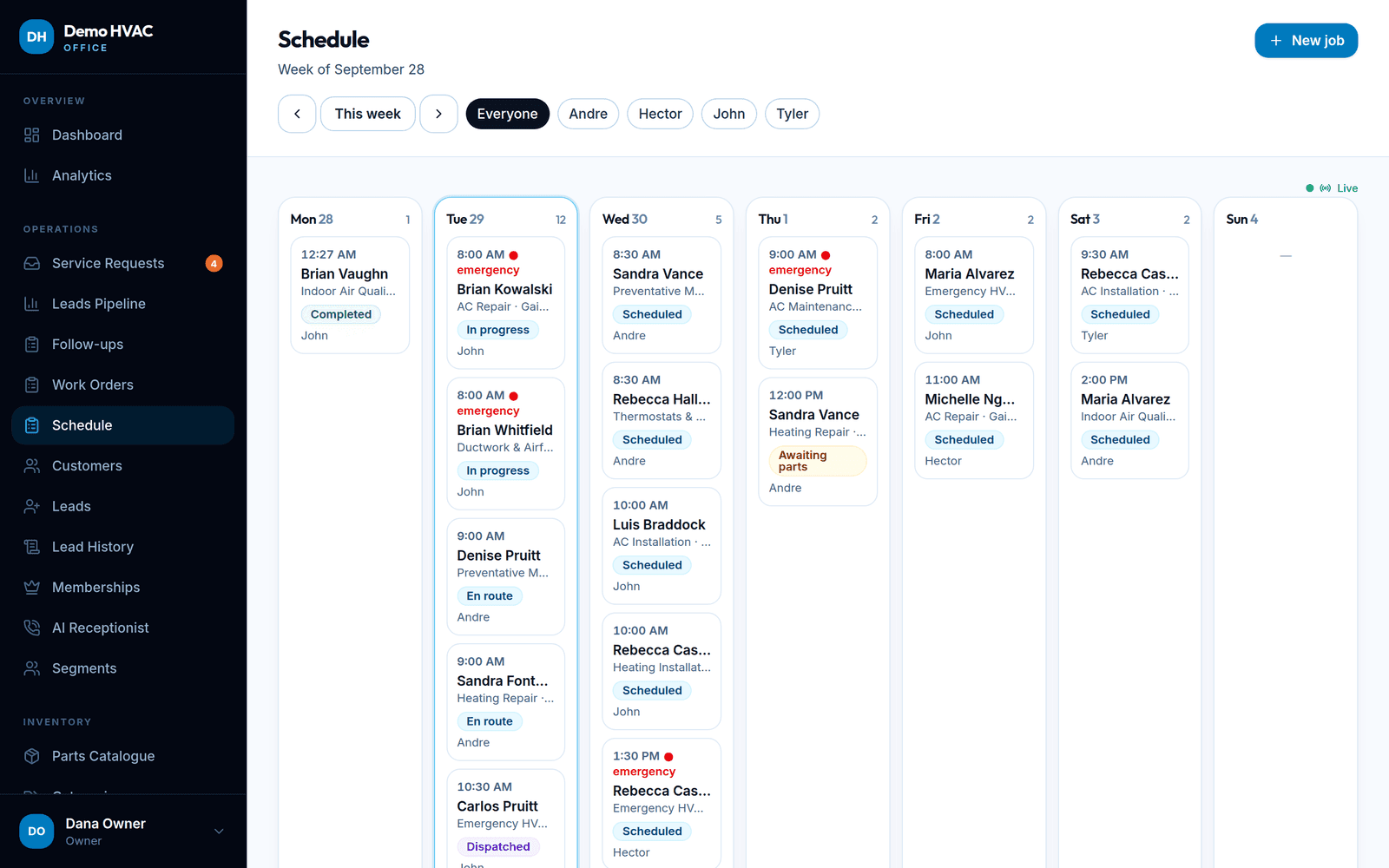
The schedule shows the week per technician with live status changes. Technicians work from a phone-sized portal: jobs, directions, the customer's own description, equipment on site, photos, diagnostic notes and the parts they used from their truck.
Included in every plan; technician seats per plan, extra seats as an add-on.
What it does
- Weekly dispatch board
- Jobs by day, filtered by technician, with emergency flags and status badges (scheduled, dispatched, en route, in progress, awaiting parts, completed).
- Live updates
- New requests, calls, payments and status changes appear on the dashboard and boards without a refresh.
- Technician portal
- Today's jobs, one-tap call and directions, what the customer said, equipment with model and serial, diagnostic reports and photos, and My Truck stock.
- Completion rules
- Optionally require at least one photo before a job can be marked complete, unless the office waives it for that job.
- Work order history
- Every status change is recorded with who and when; labour hours, service fee and parts roll into the invoice.
- Fleet records
- Vehicles with their assigned technician; each truck is also an inventory location.
Works with
See it with your own company name on it.
Create your company, pick a layout, and book your first job — the trial is free and needs no card. 14-day free trial.